
EV vs. Standard Code Signing Certificates
The trustworthiness of software downloaded from the internet and user protection is based on the use of code signing certificates. Specifically, it is necessary to sign every piece of software released for the Windows operating system. Code signing certificates are crucial for developers because they ensure trustworthy distribution and enhance their reputation.
There are two types of CODE signing certificates: Standard CODE signing certificates (OV) and EV CODE signing certificates. The main differences between them lie in the level of security, the verification process, and the trustworthiness they provide to users.
Article Content
Hide article detailsWhich CODE to choose?
In principle, both types of CODE certificates are identical. The CA must perform applicant validation, they are issued on a token, HSM device, or to a secure cloud. The signing and signature properties are the same. So what is the difference between EV CODE and Standard CODE?
Standard CODE signing (OV)
- Basic applicant validation - verification of company existence, verification of person (ID and face recognition).
- USB token, HSM module, secure cloud.
- Need to build reputation in the Windows ecosystem.
- Significantly lower price compared to EV CODE.
EV CODE signing
- Extended validation - verification of company existence, address confirmation or telephone verification, verification of person (ID and face recognition), stricter identity verification process.
- Most trusted CODE certificates.
- USB token, HSM module, secure cloud.
Immediate trust in the Windows ecosystem (SmartScreen).- Required for access to the Windows Hardware Developer Center Dashboard Portal, through which all kernel-mode drivers targeting Windows 10 (build 1607 and later) must be signed.
EV CODE Certificate and SmartScreen
EV Code Signing certificates previously provided immediate trust within Microsoft’s SmartScreen technology. SmartScreen is a security feature integrated into Windows and the Microsoft Edge browser, which helps protect users from downloading and installing malicious software by checking the reputation of the signing certificate.
In the spring of 2024, company Microsoft announced a plan to evaluate EV Code certificates in the same way as regular Code certificates. This means that EV Code certificates will no longer automatically "skip" the SmartScreen filter, but will have to build a reputation under Microsoft's control. These changes have been showing up after the updates since April 2026.
Test code certificates - Demo SW
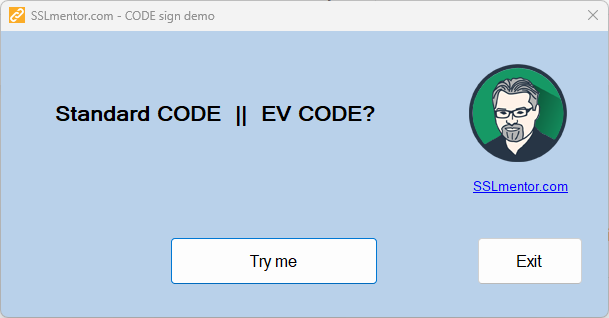
To test the behavior of Standard CODE and EV CODE, you can use our testing software written in dotNET and signed with CODE certificates Certum Code Signing in Cloud and Certum EV Code Signing in Cloud.
Standard CODE signing
- MS Edge, Chrome - warning!
- MS Windows - SmartScreen
- User trust must be explicitly granted.
- DOWNLOAD DEMO - Certum Standard CODE signing
EV CODE signing
- MS Edge - trouble-free download
- MS Windows - SmartScreen is
notdisplayed - Chrome - warning! This is normal here, Chrome has its own databases.
- We did not test antivirus programs.
- DOWNLOAD EV DEMO - Certum EV CODE signing
How to gain reputation
Reputation can only be gained over time and by frequently signing software that users download and install. The more users install the software without issues, the faster the publisher's reputation is built. Ideal numbers are hundreds or thousands of installations. When signing, it is advisable to use timestamps so that the signature remains valid even after the certificate expires.
However, only Microsoft knows the exact evaluation of reputation.
Manual reputation acquisition
If you have a small number of downloads and are struggling to gain reputation, you can try to acquire reputation using the following steps.
1/ You can use the Microsoft WDSI File Submission service, where you can upload your signed software for analysis. This way, you can speed up the process of gaining reputation for your software.
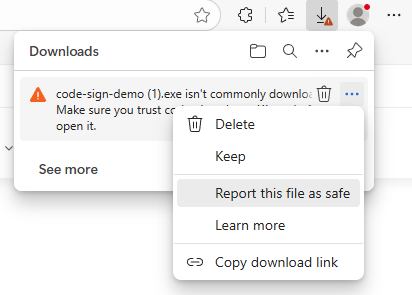
2/ You can download your software in the Edge browser and select the link "Report this file as safe", which leads to a Microsoft Feedback form where you will need to fill in various information about the software and your company.
These steps can help accelerate the process of gaining reputation for your software, but there is no guarantee that it will lead to an immediate result. The best approach is to combine these methods with regular signing and wider distribution of your software.
Customer Experience
I submitted our executable file (.EXE) to Microsoft Security Intelligence at least three times. Each scan always confirmed that the files were safe. I decided to "File a dispute." because the reputation issues persisted. I explained that my company is 22 years old and has a small user base who are generally non-technical. I mentioned that I have a new CODE certificate.
Microsoft's initial response was that the files were safe and that they could just wait for the certificate's reputation to build naturally. I countered by explaining that I offer specialized software, not a mass-market product, which means that organic reputation builds much more slowly. I specifically requested that they whitelist the certificate itself, not just the individual files, to avoid further issues.
I tried to expedite the process by deploying a new certificate to increase the number of in-the-wild detections. Finally, I requested escalation to a higher department. Based on this request, Microsoft confirmed that my certificate was now officially whitelisted.
If anything is missing on this page, you don't understand something, or the behavior of the signed SW is different, please do not hesitate to contact us!
Where next?
Back to Help
Found an error or don't understand something? Write us!